A few months ago, I discovered GatewayToHeaven, a vulnerability in Google Cloud’s Apigee that allowed for reading and writing verbose cross-tenant access logs and analytics data. Some of the data contained plaintext access tokens, which could be exfiltrated to potentially impersonate any end user of any organization that uses Apigee. This vulnerability was assigned CVE-2025-13292.
This article is for:
- Cloud security researchers and bug bounty hunters looking for new approaches to finding vulnerabilities in complex, multi-tenant architectures.
- Cloud and software engineers interested in learning about potential points of failure in their own architectures and seeing how an attacker might approach their SaaS products.
We will explore the internal architecture of Apigee, how to gain an initial foothold in Apigee’s tenant project, and how to escalate those privileges and access data belonging to other organizations.
For a shorter, less technical examination of the vulnerability, feel free to check out this executive summary.
Table of Contents
Open Table of Contents
What is Apigee
As specified by Google:
Apigee provides an API proxy layer that sits between your backend services and internal or external clients that want to use your services.
You can use custom policies to configure its behavior all along the flow of the request, sent from the end user to the backend and back. These policies can be used to add authentication to a backend that does not support it, convert the request or response from XML to JSON and vice versa, remove and add headers, and so on.
Apigee is a managed service, meaning that Google takes responsibility for setting up the resources necessary to run it. You are not required to set up your own servers and run the Apigee infrastructure on them - Google Cloud does that for you. These resources are set up in a special Google Cloud project called the tenant project.
What are Tenant Projects
As you might know, projects in Google Cloud Platform (GCP) are used to create a clear security boundary between resources, even if they belong to the same organization. Tenant projects are simply GCP projects provisioned under the Google organization, used to host the resources of a managed service dedicated to a single service consumer.
When enabling Apigee in a project, Google creates a dedicated tenant project associated with it, where Apigee-related resources are hosted. Each one of these Apigee-enabled projects is associated with a different tenant project. This allows for a strong, logical separation between the resources used in one tenant and others, even though all have resources managed by Google. Because tenant projects are managed by Google, consumers don’t have permissions to access them directly.
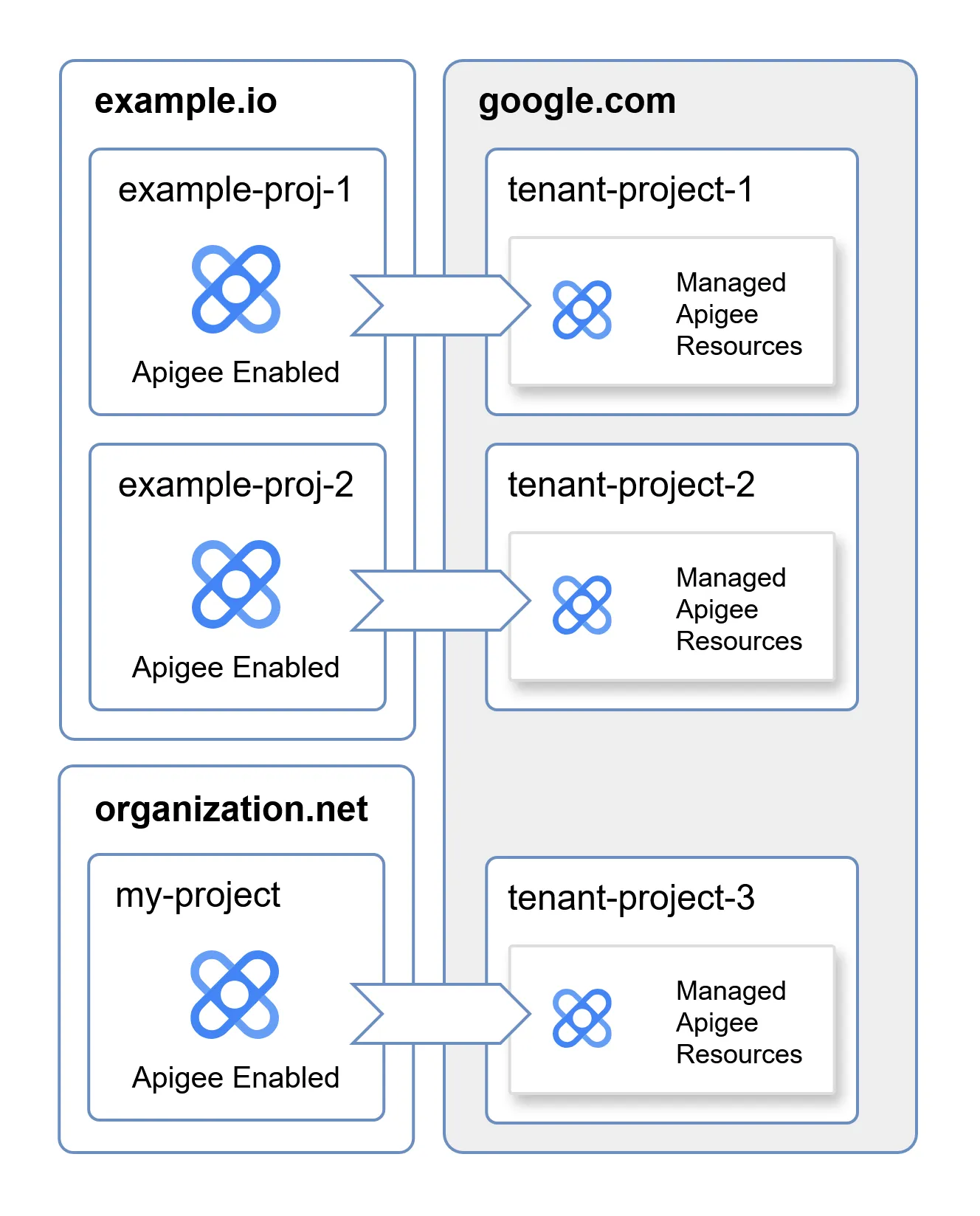
Tenant projects are interesting because they blur the line between what belongs to the consumer and what belongs to Google. This raises the questions: what resources does the Apigee tenant project contain? Are these resources associated with any Google-managed service accounts? Do any of the service accounts have access to cross-tenant resources, hosted outside of a tenant project?
As explained earlier, the consumer does not have direct access to the resources in the tenant project, which makes enumerating it much harder. To gain a deeper insight into its internal architecture, we must first discover a way to gain an initial foothold in the tenant project.
Gaining Access to the Apigee Service Account
As of now, this is how we view the tenant project and our theoretical cross-tenant target:
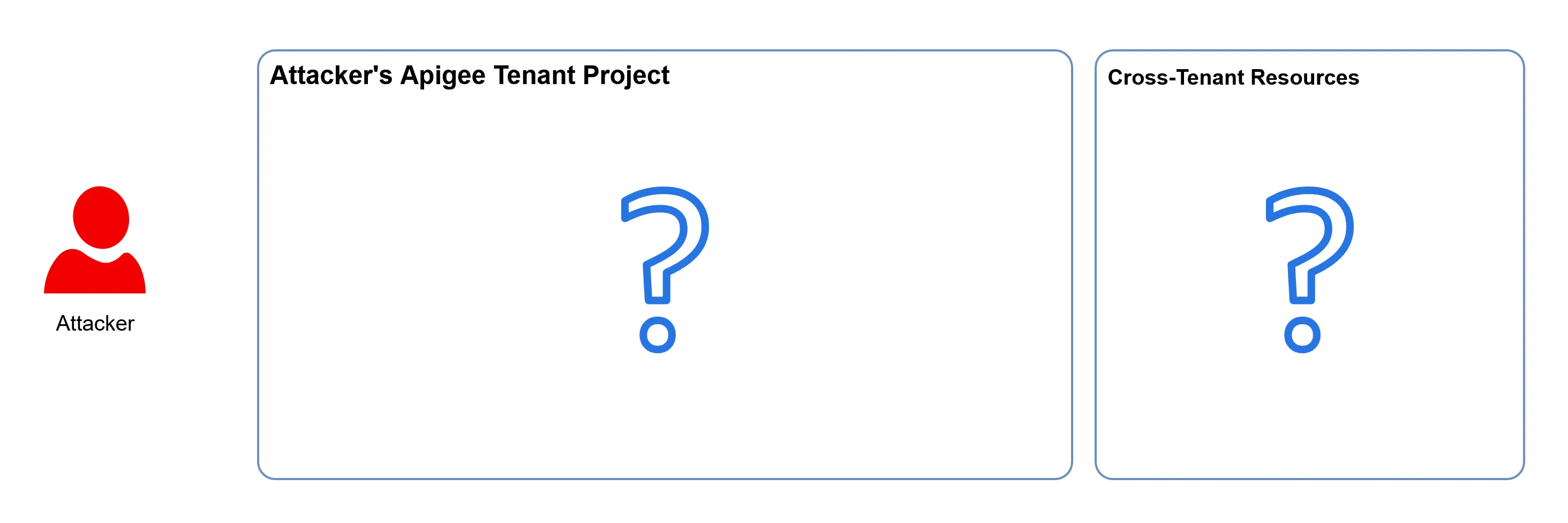
As we can see, there isn’t much to go on.
A good place to start when faced with a new cloud research project is the documentation. Apigee also has a hybrid version, which allows it to be deployed outside of the cloud, and thus outside of the tenant project. While the cloud and hybrid deployments are different in certain ways, they are also similar in many others, and exploring the well-documented hybrid version could expose how the components in the cloud version are configured.
This is a rough schematic of the hybrid deployment of Apigee:
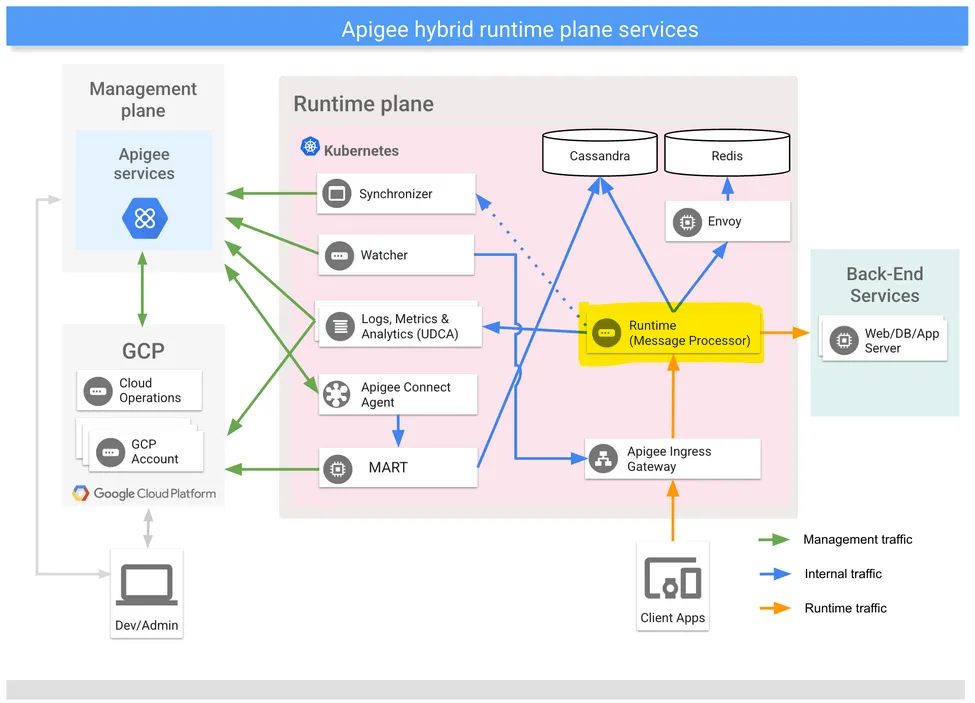
The architecture is complex and not entirely relevant as of now. It is important to note that it is based on Kubernetes, which the cloud deployment also uses - and that the main component of Apigee is the Message Processor, highlighted in yellow in the schematic.
The Message Processor is the API proxy sitting between the end users and the backend services - all of the end-user requests that go through Apigee are processed by it. All the other components exist in order to make it work as expected - serving it the most up-to-date configuration, and streaming analytics back to Google.
In Google Kubernetes Engine, pods such as the Message Processor have access to a metadata endpoint just like the underlying compute instances on which they run. This virtual endpoint can be used by workloads to gain insight about their execution environment, such as the name of the instance in which they run, the GCP project they are provisioned in, etc. This metadata endpoint is also used to distribute short-lived service account tokens to workloads, which makes it a perfect endpoint for attackers to target in order to escalate their privileges. The metadata endpoint is accessible through an HTTP server hosted on the address 169.254.169.254
This raises an interesting question - can we configure Apigee to use the metadata endpoint as a backend? Because the Message Processor is the proxy component that forwards our request to the backend, configuring the address 169.254.169.254 should expose its own metadata endpoint to end users.
There is another issue we must address beforehand: Apigee adds the X-Forwarded-For header by default to all proxied requests, which makes the metadata endpoint reject the request, as a defense mechanism against Server-Side Request Forgery. Luckily (for us), it is possible to bypass it by using the AssignMessage Apigee policy, which can be used to remove headers from the request before it is sent to the backend.
With the metadata endpoint of the Message Processor exposed, it is possible to request the token of the service account associated with the workload:
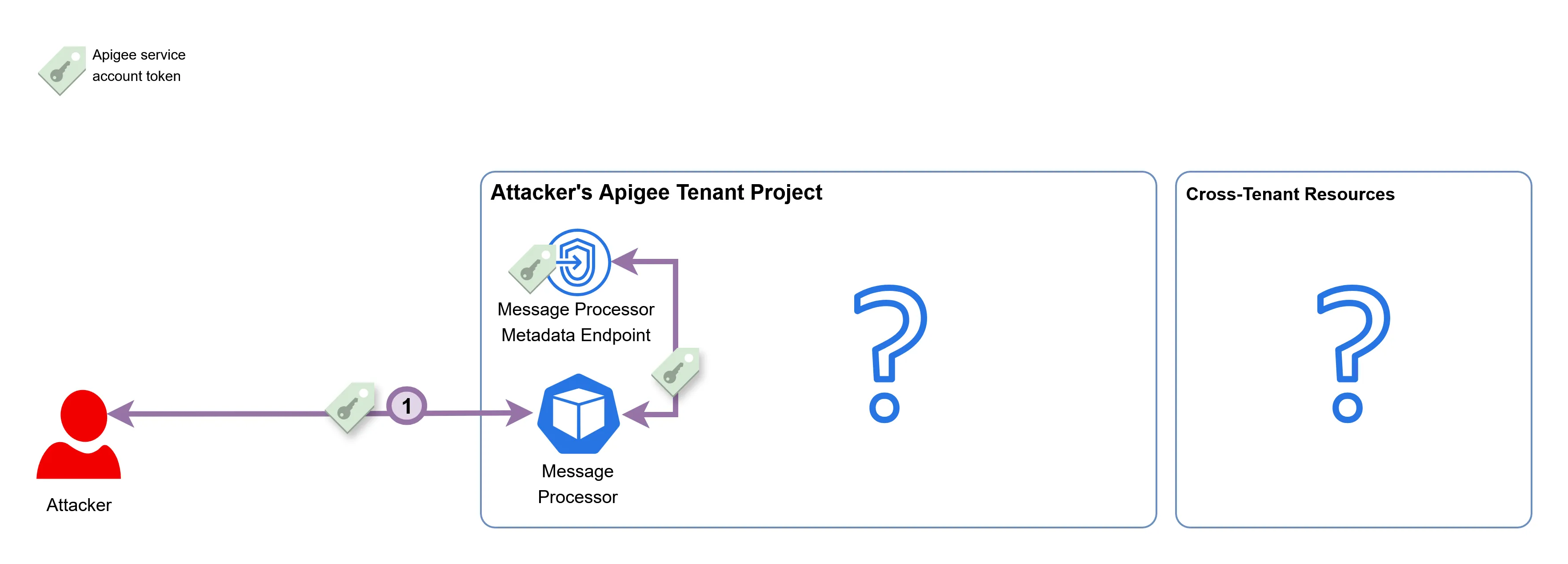
The email associated with the Apigee service account is service-PROJECT_NUMBER@gcp-sa-apigee.iam.gserviceaccount.com. The domain of the email address shows that this service account was created under the gcp-sa-apigee project, which is a project managed by Google. Due to it being a Google-managed service account, it is likely to have permissions over certain Google-managed resources.
Reconnaissance of the Tenant Project
After getting access to the token of the Apigee service account, we can attempt to use it to enumerate what other resources and workloads exist in the tenant project. To do so, we need to understand what permissions the service account even has. gcpwn is a useful permission enumeration tool that can iterate over all the possible permissions the service account can have and check whether they exist.
Some of the useful permissions discovered by it were:
- Full access to compute disks and snapshots in the tenant project.
- Read and write access to all storage buckets in the tenant project.
- Write access to PubSub topics in the tenant project.
With these permissions, we can list and read resources such as disks, snapshots, and control the contents of buckets we know the name of. This is the output of the gcloud compute disks list command on the tenant project, using the Apigee service account token:
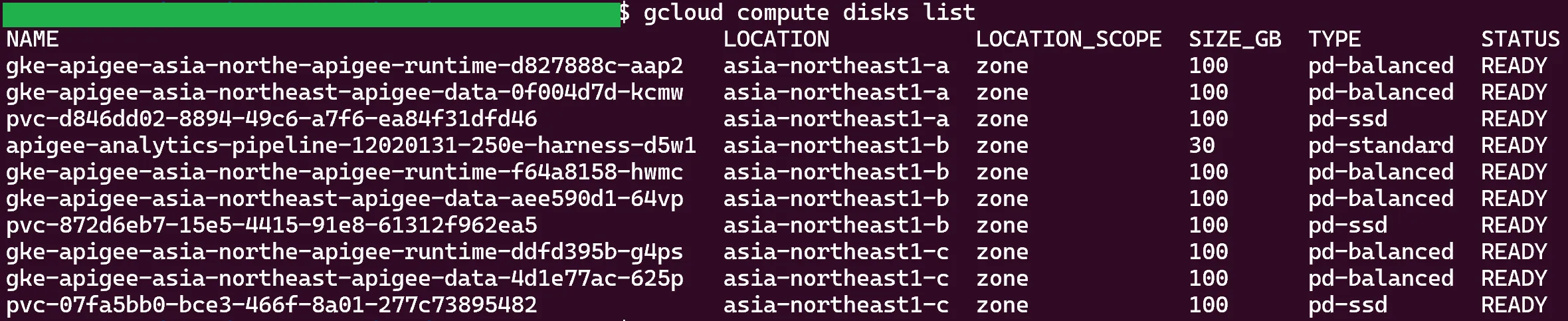
There are Google Kubernetes Engine (GKE) disks, PVC disks (persistent disks used by certain GKE pods), and a disk related to some sort of analytics pipeline. Reading the contents of these disks will allow us to uncover the behavior of the components in the tenant project.
In order to dump the contents of the disks, it is necessary to do the following:
- Take a snapshot of the disk.
- Migrate it to a different project under our control.
- Reconstruct a new disk from that snapshot in our own project.
- Create a compute instance and attach the disk to it.
- Mount the disk and view its contents.
I started my research by skimming over all of the log and configuration files in the dumps, trying to map the architecture of the tenant project. In addition, I kept searching for any hints of cross-tenant resource access. While I did look at everything, it was the analytics pipeline disk that piqued my interest.
In it, there was a file named boot-json.log, that contains logs about the behavior of the analytics compute instance:

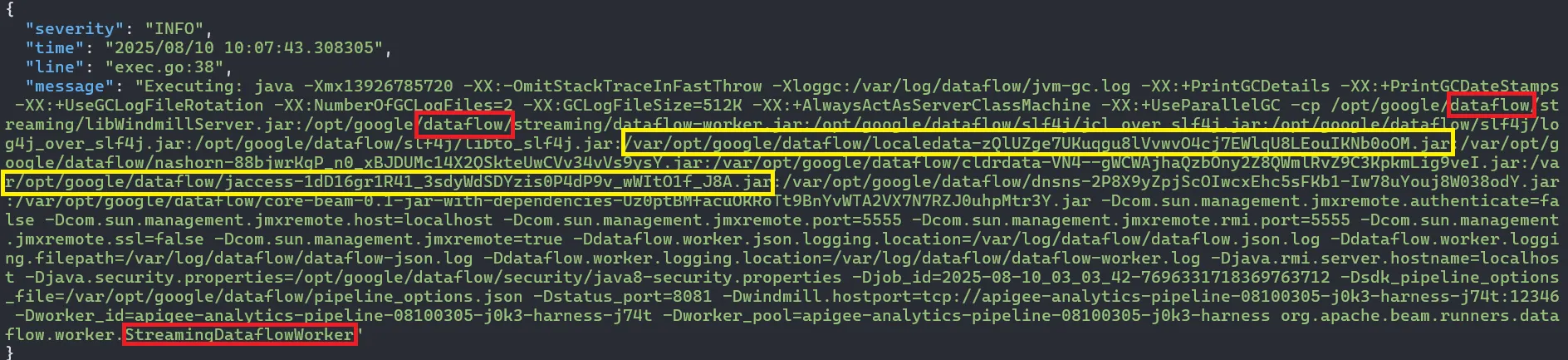
These logs show two things:
- The tenant project has Dataflow configured, and this disk belongs to one of its compute instances. Dataflow, as described by Google, is a Google Cloud service that provides unified stream and batch data processing at scale. Dataflow can be used to create data pipelines that read from one or more sources, transform the data, and write the data to a destination.
- Upon initialization, the Dataflow pipeline accesses a bucket, downloads JARs, and uses them as dependencies upon execution.
The bucket from which the JARs are downloaded is in the tenant project, and the Apigee service account has the permissions to read and write to it. We can leverage these permissions and patch one of the JARs with malicious code, achieving Remote Code Execution (RCE) on the Dataflow compute instance.
But would it even help us? What do we stand to gain by doing that?
Another file from the dump, pipeline_options.json, shows that the Dataflow pipeline is executed with a different service account, apigee-analytics@TENANT-PROJECT.iam.gserviceaccount.com:

Which might have some cross-tenant permissions. The same file also had the following configuration value:

Where the name of the specified metadata bucket lacks any random suffix, hinting it might contain cross-tenant metadata.
I then decompiled the Dataflow JARs in order to further examine how the metadata bucket is used. This showed even more potential!
As you can see in the following screenshots, the metadata bucket is the root path of several cache directories, one of them is tenant2TenantGroupCacheDir:


The parameters for the function constructing the cache directories are:
getCustomerTypewhich seems to always return the stringrevenuereposeems to always be the stringedgedsis either of the stringsapiormint.
None of the parameters of this path contain any tenant-specific value! This goes to show that the file path is not dependent on the tenant itself, hence multiple tenants can access the same cache file!
Later in the refreshApiUapContext function, tenant2TenantGroupCacheDir is passed to getTenant2TenantGroup and the result is saved to the context object under TENANT_2_TG:

The getTenant2TenantGroup function reads and parses the latest JSON file from the cache directory, iterates over all the tenant groups, and for each of the tenants, maps the tenant name to the tenant group name:
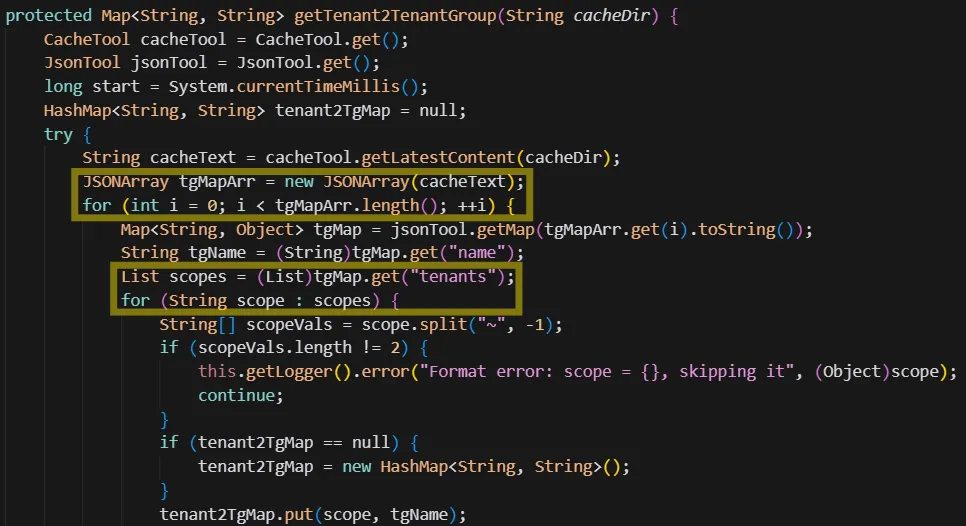
It seems like the tenant group map initialized by Dataflow should hold the names of all Apigee tenants!
Looking back at the simplified tenant project architecture, we can see it looks like this now:
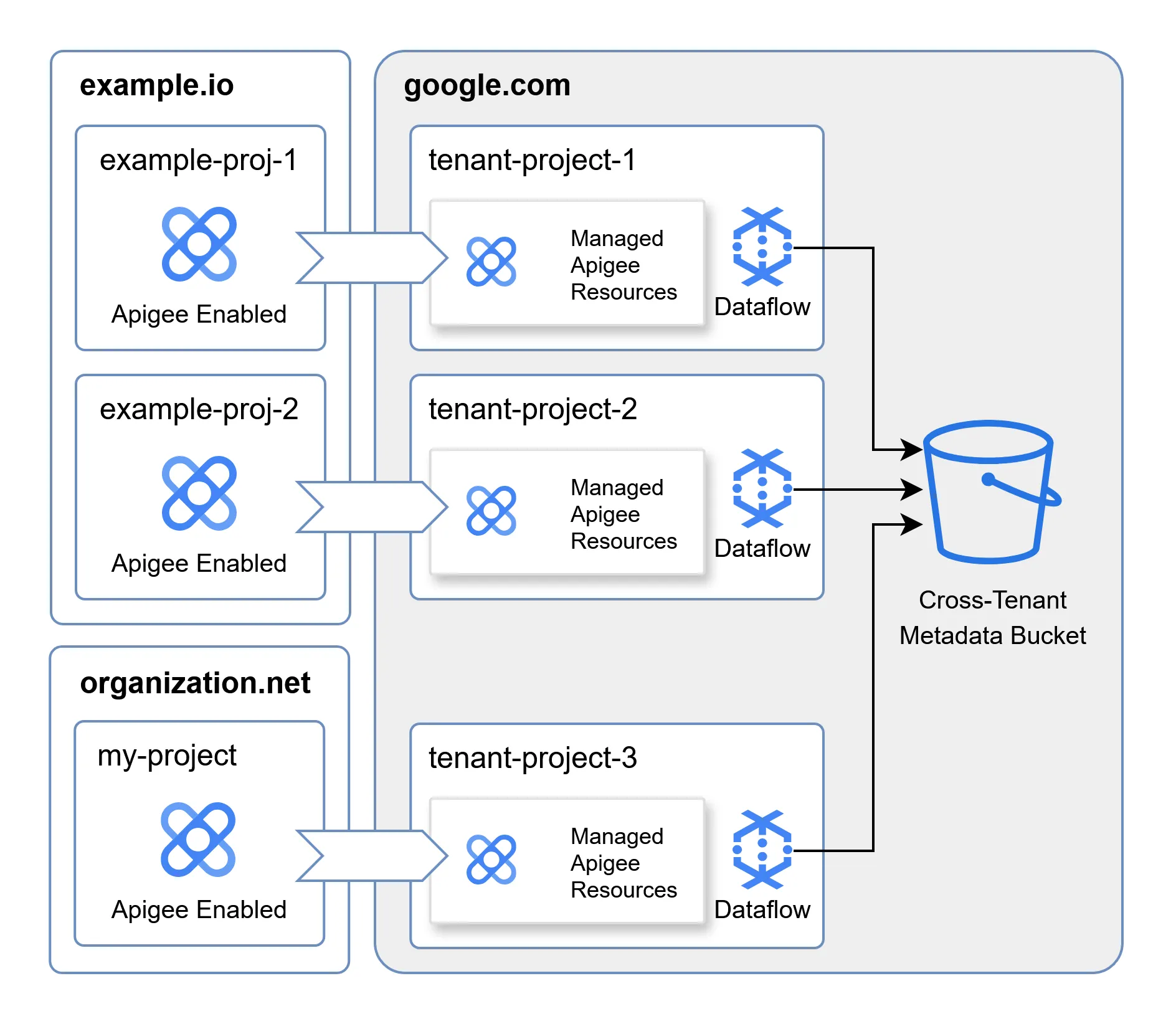
Where the cross-tenant metadata bucket is accessed by all the Dataflow pipelines in the tenant projects.
When looking at the architecture of a single tenant project from the point of view of the attacker, it now looks like this:
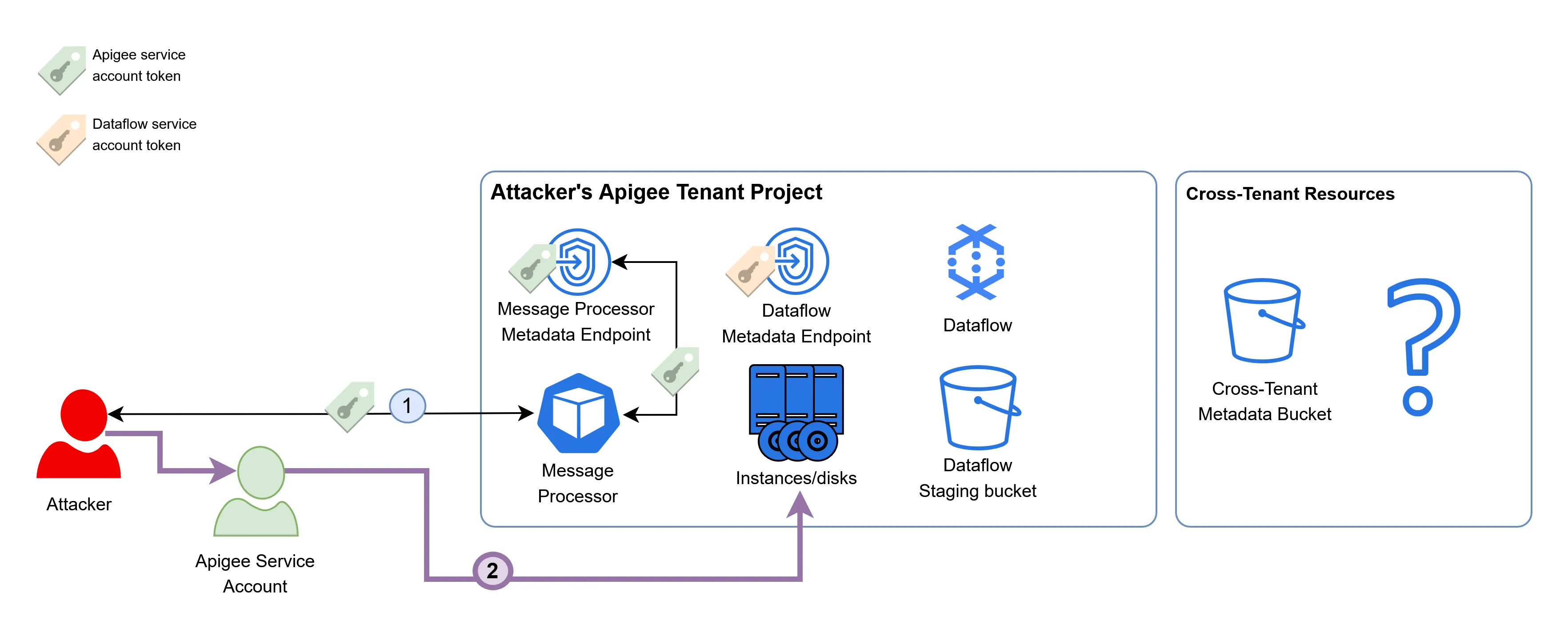
This was enough to convince me that this exploit had some serious potential. The last step, then, would be to execute code within the Dataflow instance and retrieve the token of the Apigee analytics service account.
Escalating Privileges as the Dataflow Service Account
To recap, we discovered earlier that the Apigee service account has permissions to write to the bucket that holds the JAR files executed by the Dataflow pipeline. We also found out that the Dataflow pipeline is likely to have access to cross-tenant resources.
In order to escalate privileges to the Dataflow service account, we can download the Dataflow JAR files from the bucket, and patch them using a Java patcher such as Recaf. Our malicious implementation will simply access the metadata endpoint of the Dataflow compute instance, retrieve the token of the Dataflow service account, and upload it to a remote server in our control.
After patching the JARs, we can use the Apigee service account to overwrite the existing ones in the bucket:
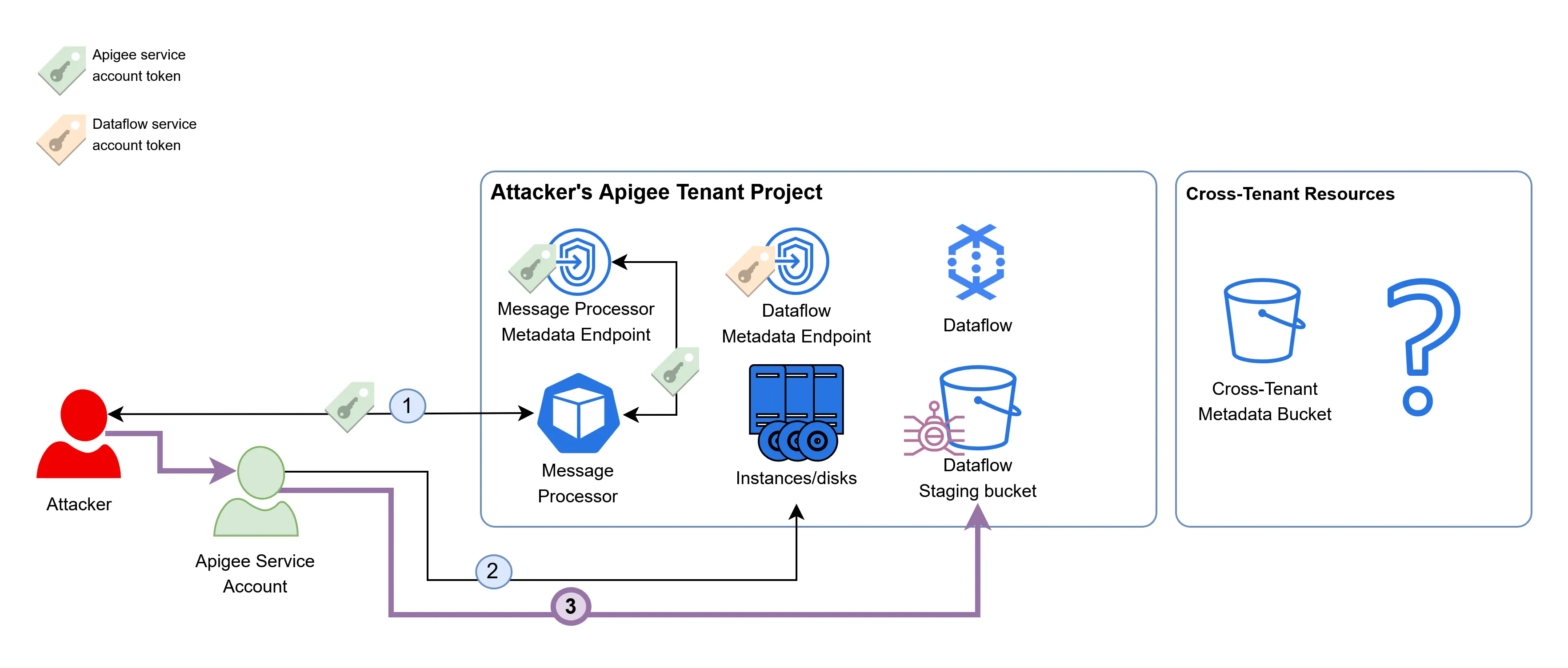
This, on its own, did not automatically infect the existing Dataflow instances. These JAR files are only fetched when a new Dataflow compute instance is provisioned - and usually this doesn’t happen without a good reason.
In order to induce the creation of a new Dataflow instance, we can take advantage of Dataflow’s autoscaling mechanism, that will provision new instances if existing ones are overstressed. By sending many fake analytics events to the existing Dataflow pipeline, a new Dataflow instance would be provisioned using the malicious JARs.
The previously mentioned pipeline_options.json file references the name of a PubSub input subscription:

And the decompiled Dataflow code shows that events are read from it:

In Google’s PubSub, events are read from subscriptions and written into topics. In the tenant project, the topic associated to the apigee-analytics-notifications subscription has the same name. We can now write a script that leverages the credentials of the Apigee service account, and writes an enormous amount of events to the PubSub topic, stressing the existing Dataflow instances, and prompting the provisioning of new ones:
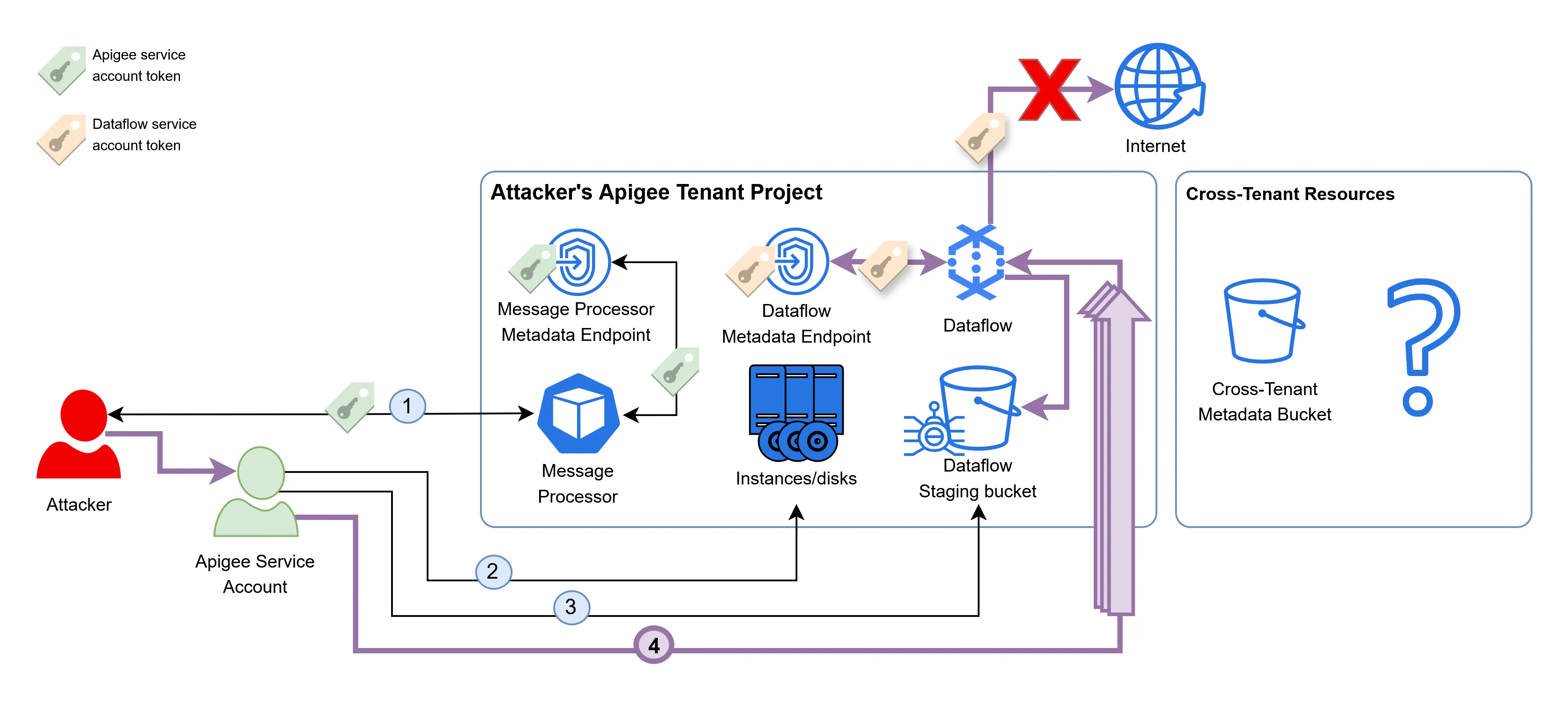
This technique successfully provisioned a new Dataflow instance that fetched the JARs, but no tokens were sent to our remote server. This is because the Dataflow compute instances in the tenant project are configured with no internet access, blocking the communication of the malicious JARs with the server.
To address this issue, we can have a Google storage bucket replace the server as a destination to send the tokens to. Even though internet access is blocked by Dataflow, it is still possible to internally access the GCP APIs:
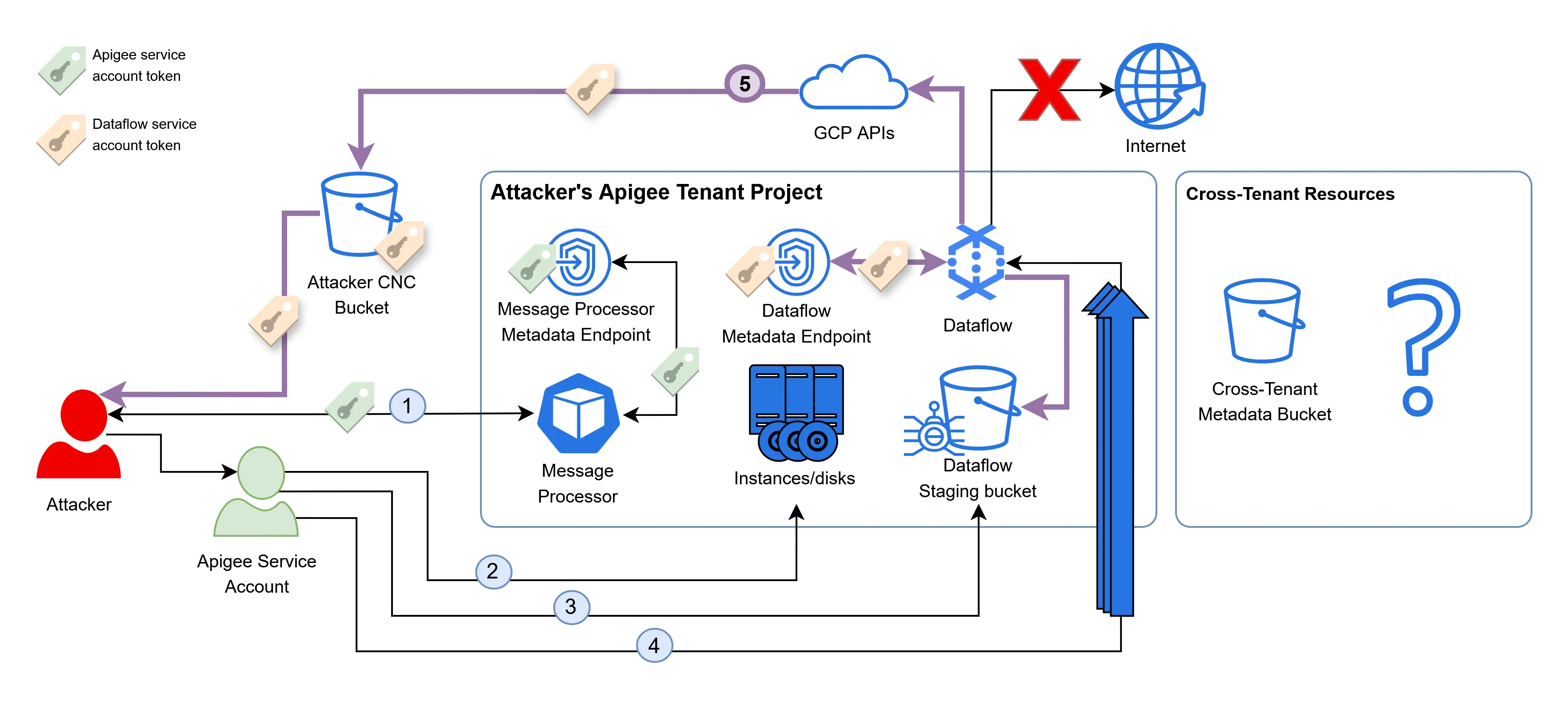
After following the setup described above, we can read the token from the bucket, which indeed belongs to the Dataflow service:

The Impact
With the token, it was finally possible to access the cross-tenant metadata bucket! In the cache directories under the tenantToTenantGroup folder of the bucket, we can see the GCP project names + Apigee environment names of many unrelated tenants, which were grouped together for some reason:
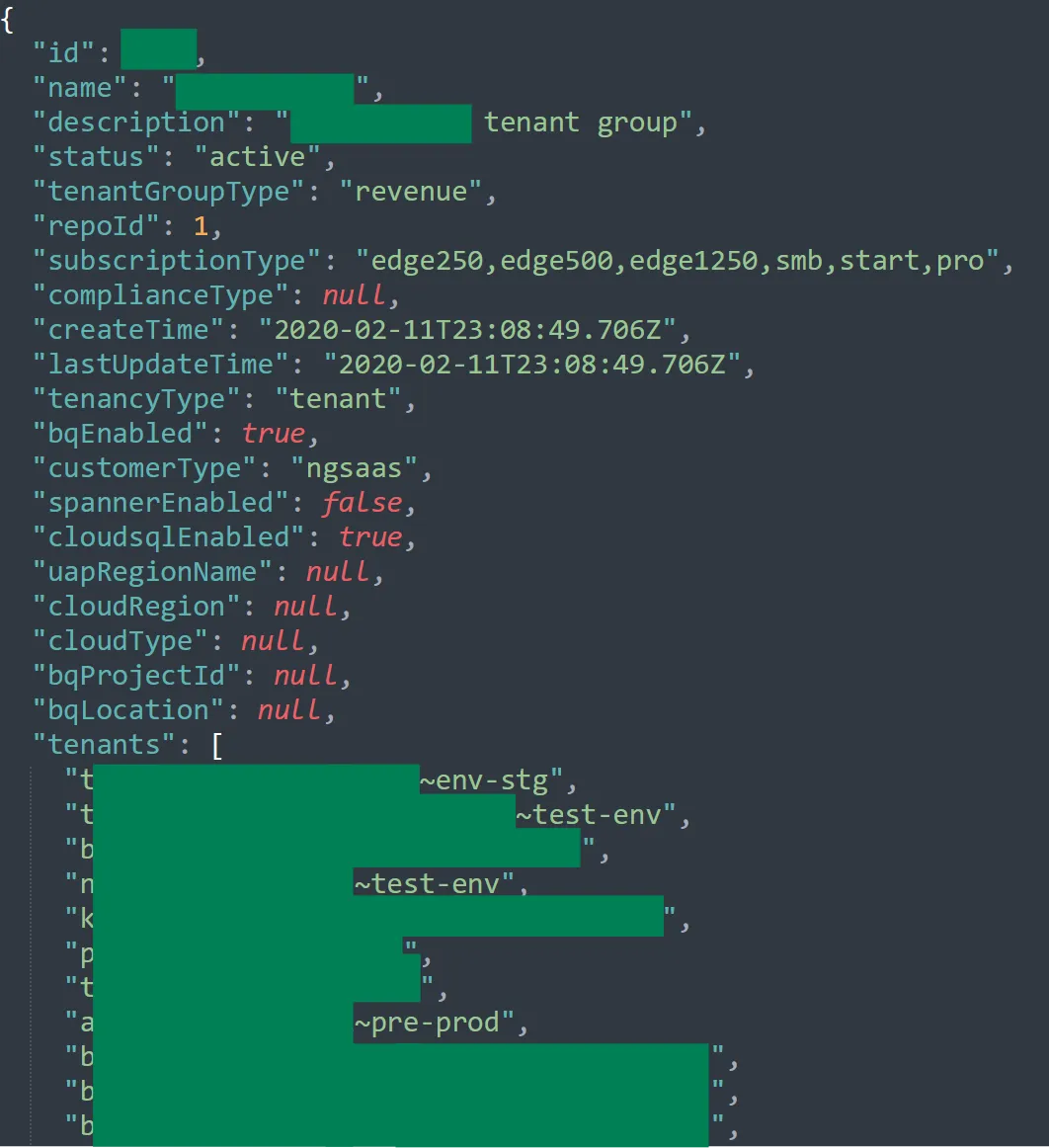
I even found an Apigee project I created earlier this year under the same tenant group as all of these other random tenants!
Under the customFields folder, all of the custom analytics fields of all the different Apigee tenants were accessible. This is an example of the custom analytics fields of one such tenant:
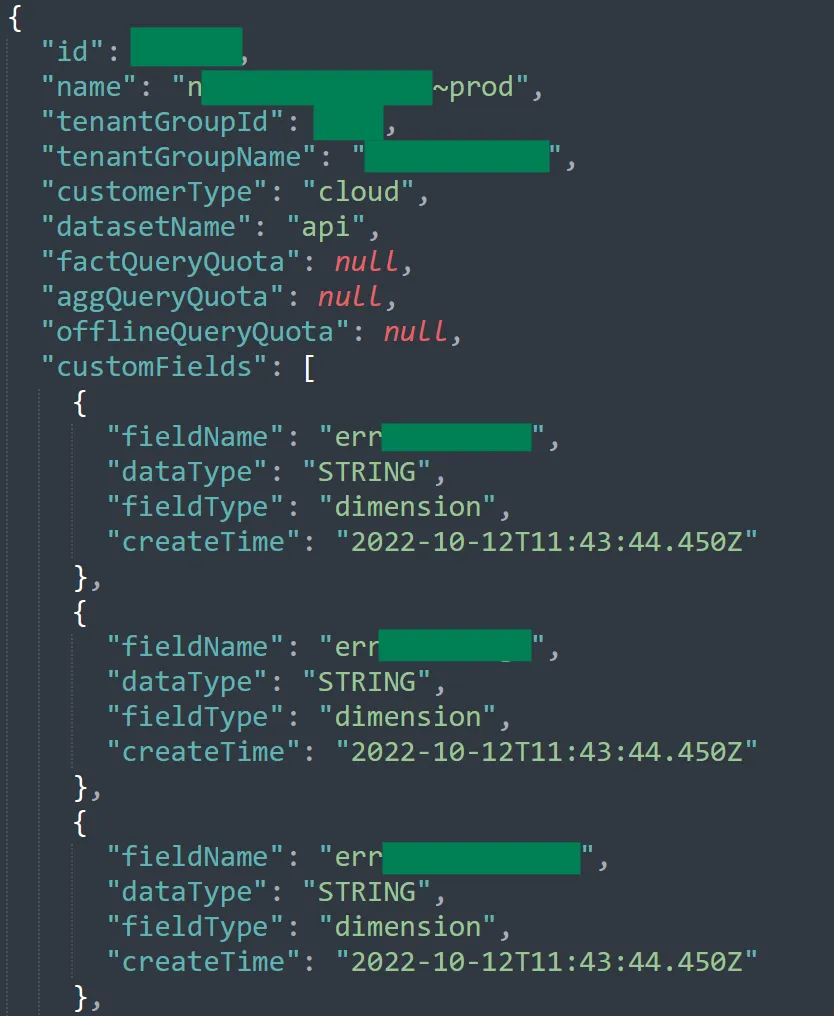
But the most interesting folder was the one named datastores. It had references to some sort of “GCS datastores”, one per GCP region:
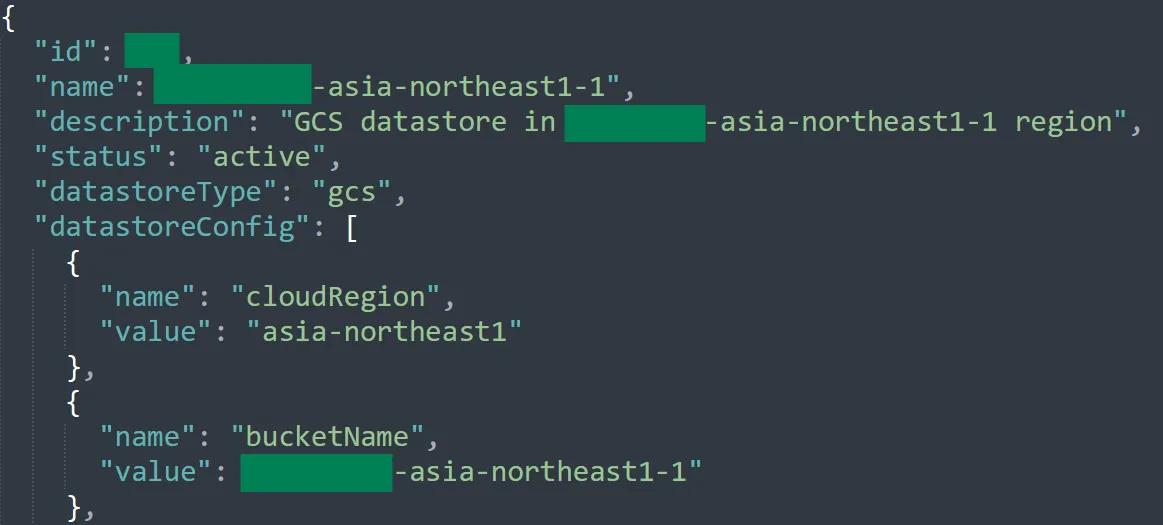
These buckets were also accessible using the Dataflow service account. After a thorough examination, it seemed that these buckets contain analytics data of every request across all the tenants of Apigee. For example, from the following analytics event of a random tenant, we can conclude that the backend is some sort of a file server, and we can see the full path of the document being fetched:

The following analytics event of a big e-commerce platform has information about the real IP of end users and their access token visible in plaintext!
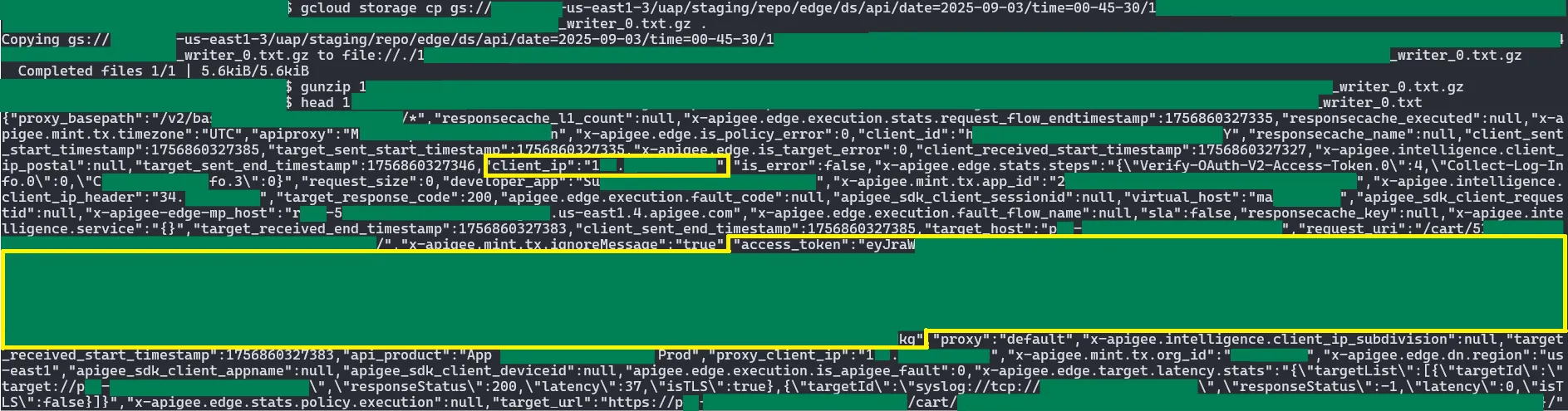
This access token was the most serious piece of information an attacker could have extracted from these logs. An attacker could have exfiltrated them and used them in order to authenticate and make requests as any end user of any Apigee tenant.
For example, let’s say that “Bank of Cyber” chose to use Apigee as a proxy layer for their backends, and used security policies to add authentication and authorization for their end users. John is a client of “Bank of Cyber”, who just accessed their backends (through Apigee) to issue a new money transfer request. An attacker can now access the cross-tenant access logs and analytics data, retrieve John’s access token, and reuse it in order to issue a malicious transfer in his name.
In addition to the access logs, these datastore buckets had a different folder called queryresults which held the CSV outputs of queries performed internally by Google, maybe as some sort of premium service given to high-profile Apigee clients:
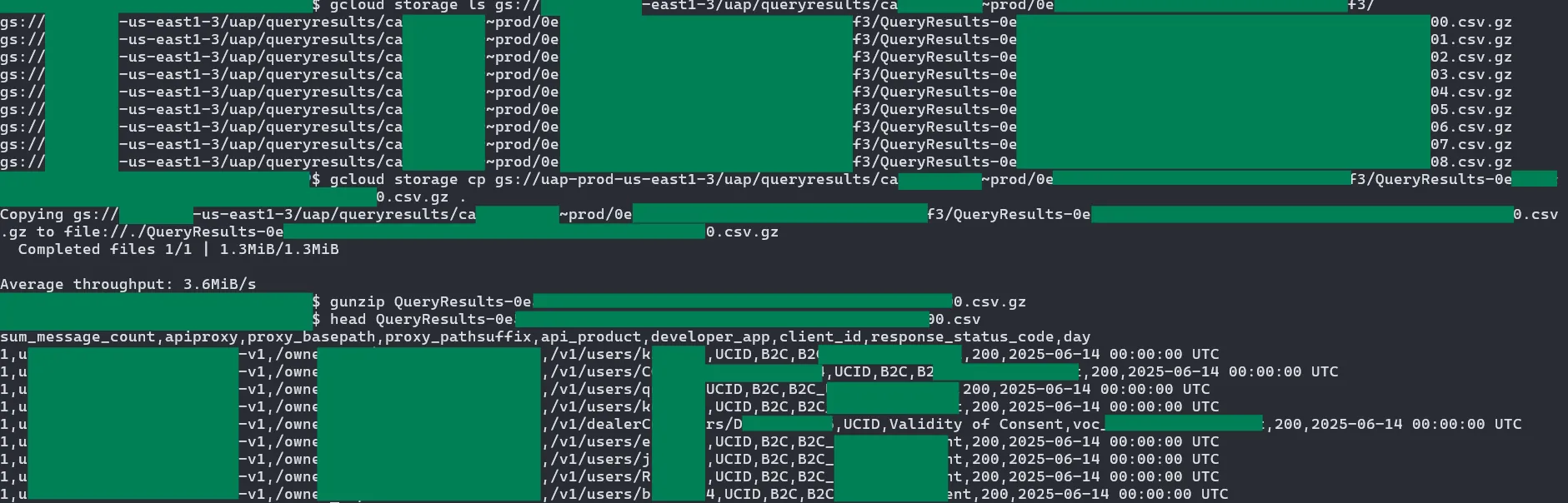
Other than read permissions, the Dataflow service account also had write permissions to these buckets. I did not attempt to write into any of them as it could potentially affect production systems that I did not fully understand, so I don’t know their exact impact. Google did reward this bug as a read/write cross-tenant vulnerability, which suggests that the write permission could have been used for malicious purposes.
Conclusion
In this article, we discussed the step-by-step process of researching and finding a cross-tenant vulnerability in Apigee. Hopefully, this writeup will help you in your bug bounty and red team endeavors, or on the other hand, to secure your own cloud architecture in case it suffers from similar issues.
The full attack path is as follows:
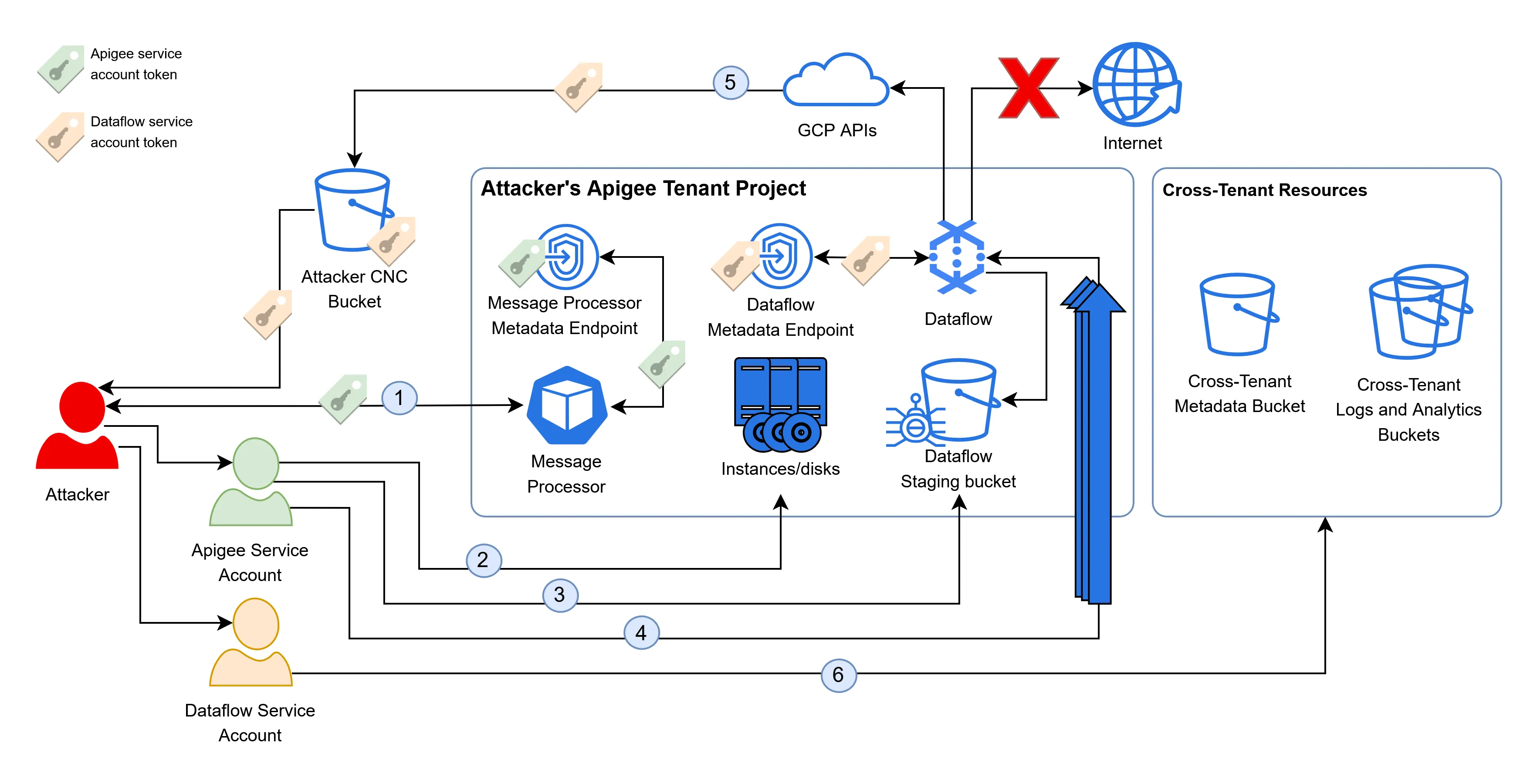
- An attacker points Apigee at the GKE metadata endpoint, fetching the service account token of the message processor in its own tenant project.
- The attacker uses the permissions of the Apigee service account to dump the disks in the tenant project, discovering the name of the Dataflow staging bucket.
- The attacker uploads a malicious JAR file to the Dataflow staging bucket.
- They then spam the PubSub topic to stress the existing Dataflow instances, inducing autoscaling and the provisioning of new Dataflow instances, which pull and execute the malicious JARs.
- The malicious JARs fetch the token of the Dataflow service account from the metadata endpoint and upload it to a GCS bucket controlled by the attacker, bypassing the network restrictions of Dataflow.
- The attacker uses the token of the Dataflow service account to access cross-tenant buckets and retrieve the analytics information of all Apigee tenants, including highly sensitive OAuth tokens, granting them the ability to impersonate users.